

A salon website that keeps itself up to date: menu, prices, booking and WhatsApp in one link
Most customers decide before they ever call. They want your prices, the nearest branch, your hours and a way to book, and one page can answer all four, as long as it never goes out of date.
The short answer
What should a salon or spa website include?
Four things a customer checks before choosing you: the full menu with current prices, each location with its address and opening hours, a way to book or message you, and a clear sense of who you are. Put them on one page that works on a phone, keep the prices tied to what you actually charge, and share the same link on Google, Instagram, WhatsApp and a printed QR.
On this page9 sections
- What does a customer check before choosing a salon?
- Why should the menu on your website come from your billing?
- How do you make the page look like your salon, not a template?
- Can customers book from the page?
- How do people find the page: Google, Instagram, WhatsApp or a QR?
- What helps the page get found and chosen: reviews and a complete menu
- How do you know the page is bringing in customers?
- How to set up your Salon & Spa page in Salvoro
- Common questions
What does a customer check before choosing a salon?
Before most customers call, they look for four answers, usually on a phone. A page that answers all four gives them a reason to choose you; one that answers two sends them to the next result. An Instagram grid shows the work but rarely the prices, and a PDF menu forwarded on WhatsApp is wrong the day a price changes.
- The treatment they want, and what it costs
- Which branch is nearest, and when it is open
- How to book: online, by phone or on WhatsApp
- Who you are, and whether it feels like their kind of place
How do you make the page look like your salon, not a template?
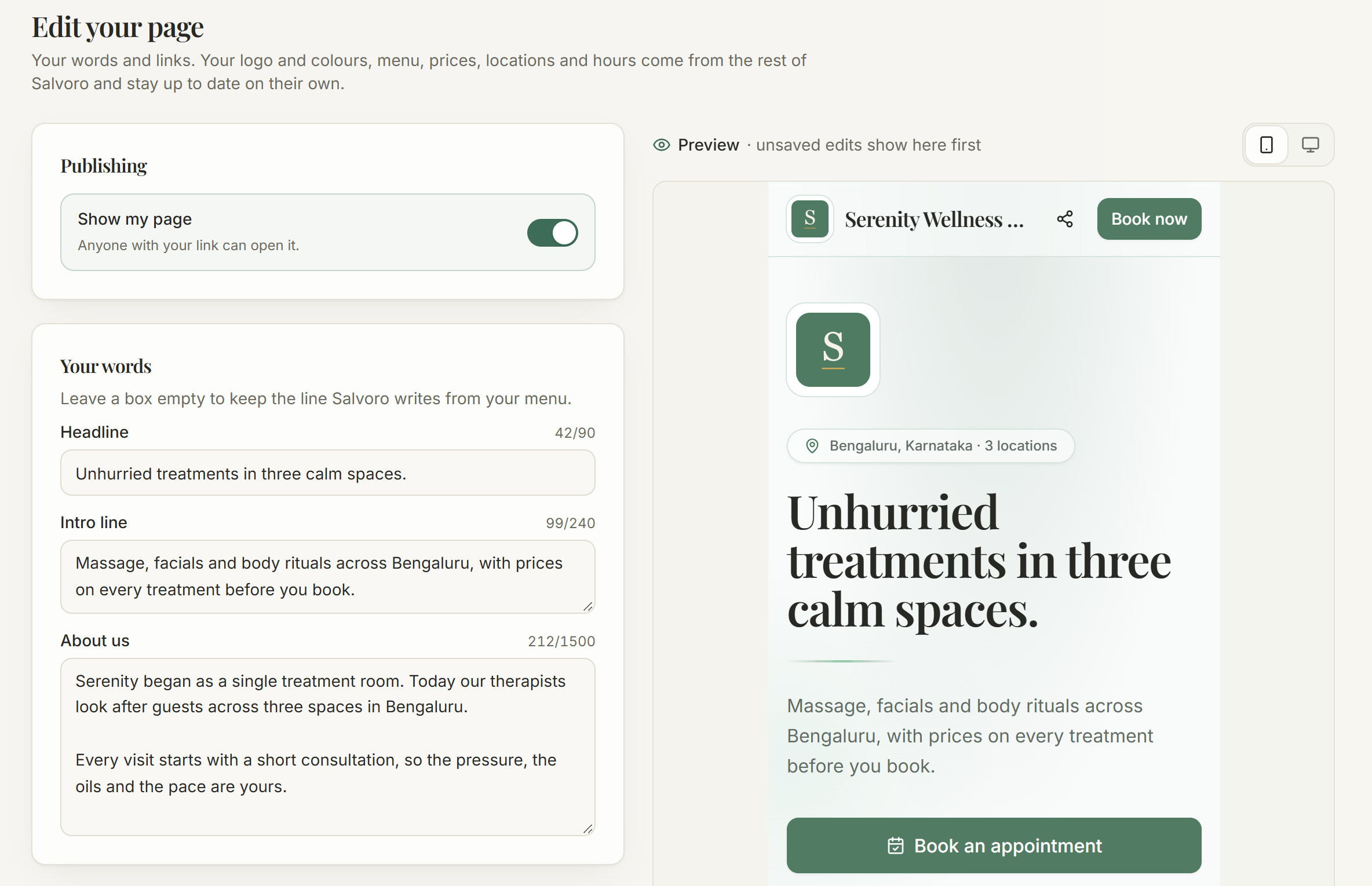
The page wears your colours: it shows the logo you uploaded in Settings and takes its main colour and highlight from it, adjusted so every button and line of text stays easy to read, in light and dark mode. Change the logo and the page follows; remove it and the page returns to a neutral charcoal-and-gold theme. The editor adds your own words on top. A live preview shows the page exactly as a phone or a laptop will, and nothing goes public until you press Save. The owner, or a team member allowed to manage settings, can edit it; a Branch Leader cannot.
- A headline, an intro line and an About us section in your own voice
- Colours taken from your logo, with no design work and nothing extra to upload
- A WhatsApp us button, plus Instagram, Facebook, YouTube and website links
- Switches to show or hide prices, the numbers band and opening hours
Can customers book from the page?
Yes, at every branch that takes bookings online. The customer picks treatments and a time, then confirms with a six-digit code sent on WhatsApp from your salon's own number: no account and no app. The booking reaches your desk as pending, for you to confirm. Where online booking is off, or no WhatsApp number is linked to send that code, the page shows Call and WhatsApp buttons instead, so nobody starts a booking that cannot finish. Payment is never taken online; customers pay at the salon.
How do people find the page: Google, Instagram, WhatsApp or a QR?
Every salon on Salvoro gets its page at www.salvoro.in/salon/ followed by its name: no domain to buy, nothing to host. It carries structured data describing your business, each branch's address, phone and hours, and your prices, and it is offered to Google once it lists at least three treatments. Pasted into a chat, it shows your own preview card. For the counter, download the QR or print the A4 poster: your name, the QR and the link, headed Scan for our menu & to book when customers can book online.
- The website field of your Google Business Profile
- Your Instagram bio, and every WhatsApp reply to a price question
- A printed QR poster at reception and on each mirror
- Each branch's own link, which opens the menu on that branch's prices
What helps the page get found and chosen: reviews and a complete menu
Each location card can carry a Leave a review link to your review page, such as your Google Business Profile. Set it in Follow-ups, on the Campaigns tab, as the Public review link under Ask for feedback after a visit, for one branch or company-wide; a branch without its own uses the company's. Customers who rate a visit 4 or 5 stars are sent there too. The page links out to reviews and never copies them. The rest is the Make your page stronger checklist on the Salon & Spa page screen:
- At least three treatments, or the page stays off Google
- An address and phone for every location
- Treatments grouped into categories, such as Hair and Skin
- A one-line description on most treatments
- Your logo, shown in the header and the link preview
How do you know the page is bringing in customers?
The Salon & Spa page screen shows the last 30 days: page views, and taps on Book, Call, WhatsApp, Directions and Share. Anyone signed in to Salvoro is not counted, nor are search crawlers. Only counts are kept, never a visitor's name or number, and they cover the whole page, not each branch. Read them together: views rising while booking taps stay flat points at the menu or the prices; calls rising after the poster goes up suggests the poster is working.
How to set up your Salon & Spa page in Salvoro
From a new account to a shared link and a printed QR poster, in five steps.
Add your treatments
In Services, add each treatment with its duration and its price at each branch; the page goes to Google once it lists three.
Complete each location
In Branches, fill in each location's address, phone and opening hours, which power the Call and Directions buttons.
Write the page in your own words
Open Salon & Spa page, choose Edit page, and add a headline, About us and your WhatsApp number, then press Save.
Decide how customers book
Switch online booking on and link a WhatsApp number to take bookings on the page; otherwise the page shows Call buttons.
Share the link and print the QR
Put the link in your Google Business Profile and Instagram bio, send it in reply to price questions, and print the A4 poster.
Common questions
- No. The page is built from what you already keep in Salvoro and lives at www.salvoro.in/salon/ followed by your salon's name, so there is nothing to design, host or renew. Using your own domain name is not offered; if you already have a website, link to the page from it, and add your website's address to the page.
- No. Every salon on Salvoro has one from the day it signs up. The editor, the QR poster and the page activity come with the same subscription.
- No. Reviews stay where customers wrote them. Each location card shows a Leave a review link to the page you set as the Public review link in Follow-ups, for that branch or the whole company; a location with no link set shows none.
- Yes. One switch in the editor removes prices from the menu, the highlights and the details search engines read, while treatments, durations and descriptions stay. Some spas prefer this for rituals and packages they quote after a consultation.
- Online booking is switched off for that branch, WhatsApp is switched off there, or no WhatsApp number is linked to send the customer's code. The Salon & Spa page screen tells you which one, and links straight to the setting that fixes it.
- One page covers the whole business, with every branch's menu, prices, hours and contact details. Each branch also gets its own link that opens the page on its menu, plus its own booking link and QR.
- Yes. Switch off Show my page in the editor and the link shows a not-found page, the page leaves search results and the booking page stops pointing to it. Switch it back on and everything returns as it was. Online booking is a separate setting.
More from the blog
See how Salvoro does it
See it with your own salon’s data
30 days free, no card required, and a guided setup that takes four steps.